You've probably seen the term "color temperature" in your display settings, heard someone mention "6500K," or noticed a slider labeled "warm" and "cool" in Night Shift. But what do these numbers actually mean? And more importantly — why should you care?
Understanding color temperature is the key to making informed choices about your screen settings, your lighting, and ultimately your eye health and sleep quality. Let's break it down from first principles.
What Is Color Temperature?
Color temperature describes the hue of white light emitted by a source. It's measured in Kelvin (K) — the same unit used for absolute temperature in physics. The concept comes from an idealized object called a black-body radiator: imagine heating a piece of metal. As it gets hotter, it glows red, then orange, then yellow, then white, then blue-white.
The temperature at which the metal's glow matches a particular light color gives us the color temperature. This is why the scale seems counterintuitive at first:
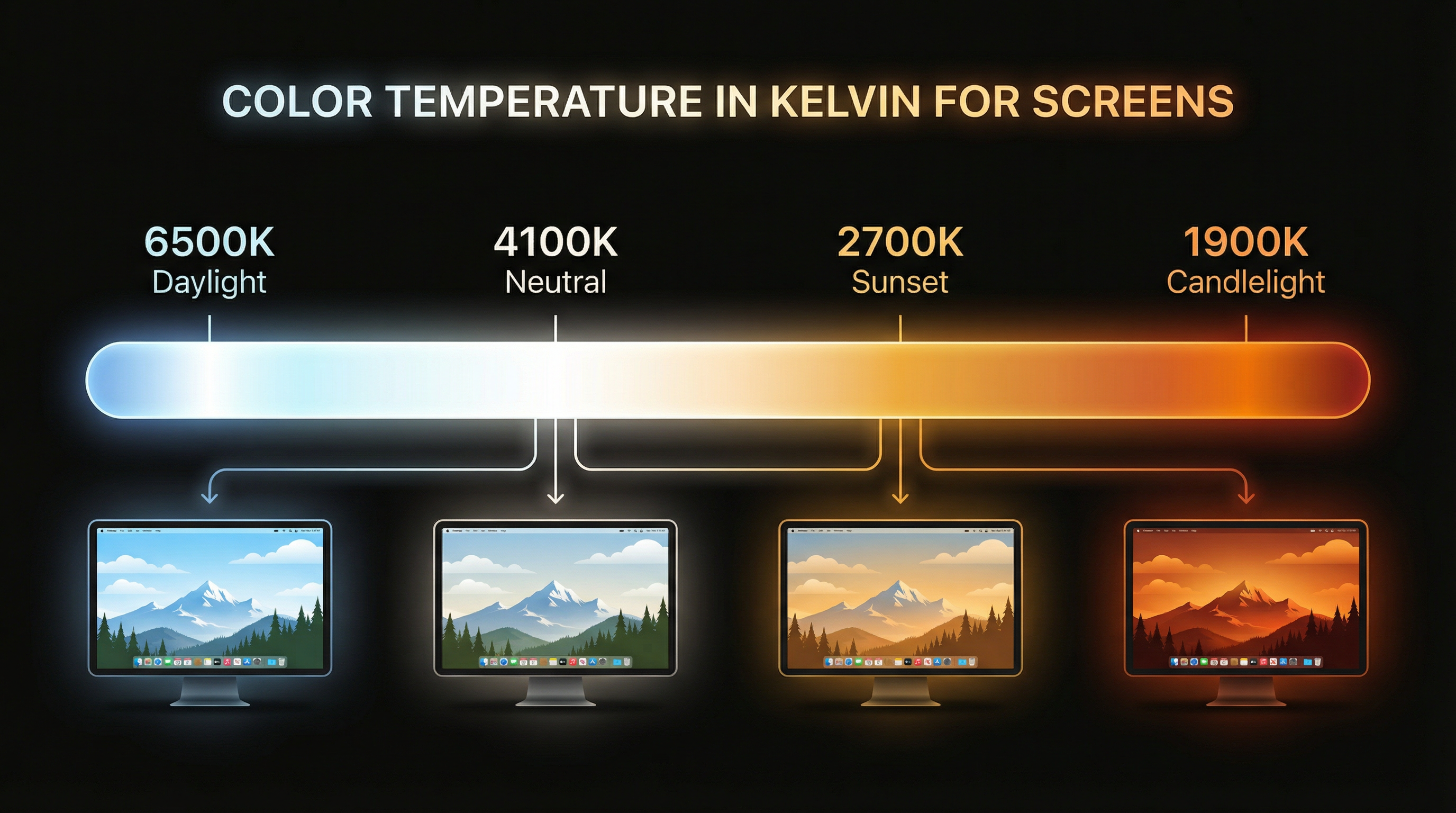
- Lower Kelvin = warmer (more red/orange): A candle flame is ~1900K. An incandescent bulb is ~2700K. These feel warm and cozy.
- Higher Kelvin = cooler (more blue/white): Noon daylight is ~5500–6500K. An overcast sky can reach 7000K+. These feel bright and alert.
The "warm" and "cool" labels refer to the psychological feeling, not the physics. Warm-feeling light (candlelight, sunset) actually has a lower Kelvin temperature, while cool-feeling light (blue sky, fluorescent) has a higher Kelvin temperature.
The Common Presets: From Candlelight to Daylight
When apps like SuperDimmer, f.lux, or Night Shift let you set a color temperature, they're filtering your display to simulate light at a specific Kelvin value. Here are the standard presets and when to use each:
1900K — Candlelight
Deep amber-orange with virtually no blue light. This is the most extreme warm setting, best used in the final hour before sleep or for very late-night reading. Text is legible but colors are severely shifted — not suitable for design or photo work.
2700K — Warm White / Incandescent
The color of a traditional incandescent light bulb. Comfortable for extended reading, browsing, and general computing at night. Reduces blue light by roughly 70% compared to daylight. A good default for evening hours.
4100K — Sunset / Cool White
A subtle warming that sits between daylight and incandescent. Reduces blue light by about 30% while maintaining reasonable color accuracy. Ideal for late afternoon through early evening — warm enough to ease eye strain without noticeably distorting colors.
5500K — Cloudy Daylight
Slightly warm compared to standard display calibration. Some photographers and designers calibrate to 5500K as a neutral reference. Minimal blue reduction, but slightly easier on the eyes than the harsher 6500K.
6500K — Standard Daylight (D65)
The default calibration for most displays and the standard white point for Rec. 709 and sRGB color spaces. This is what your Mac shows when no color temperature filtering is active. It's accurate for color work but contains the full spectrum of blue light — not ideal for evening hours.
1900K (Candlelight) → 2700K (Night) → 4100K (Sunset) → 5500K (Cloudy Day) → 6500K (Standard Daylight). Lower = warmer/more amber. Higher = cooler/more blue. For evening use, aim for 2700K–4100K.
Why Color Temperature Matters for Your Eyes
There are two distinct mechanisms through which color temperature affects you:
1. Blue Light and Melatonin Suppression
Your eyes contain specialized cells called intrinsically photosensitive retinal ganglion cells (ipRGCs) that are particularly sensitive to blue light in the 460–480nm wavelength range. These cells signal your brain's suprachiasmatic nucleus (your internal clock) about ambient light conditions.
A landmark 2014 study in PNAS by Chang et al. found that participants who read on a light-emitting device before bed (compared to a printed book) showed:
- Suppressed melatonin — the hormone that signals sleepiness — with levels delayed by over 1.5 hours
- Delayed circadian rhythm — their body clock shifted later
- Reduced REM sleep — even after 8 hours, they reported feeling less rested
- Increased morning grogginess — alertness took longer to reach baseline
By reducing your display's color temperature in the evening — shifting from 6500K toward 2700K — you significantly cut the blue wavelengths responsible for these effects.
2. Visual Comfort and Contrast Fatigue
Blue-heavy light creates a harsher viewing experience because short-wavelength blue light scatters more in the eye's optical media (a phenomenon related to Rayleigh scattering). This increased scattering reduces contrast sensitivity and can produce a subtle "glare" effect even on well-calibrated displays. Warmer color temperatures reduce this scattering, producing subjectively sharper, more comfortable text rendering — especially on dark backgrounds.
When to Use Each Setting
The ideal color temperature depends on the time of day and what you're doing:
- Color-critical work (design, photo editing, video): 6500K during daylight hours. Accuracy matters more than comfort for short sessions. Use a calibrated display profile.
- Daytime general use (coding, writing, browsing): 6500K or 5500K. If you find standard daylight harsh, try 5500K — it's a subtle improvement.
- Late afternoon to early evening: 4100K–5000K. Start the transition early. Your eyes will adapt and you won't notice the shift.
- Evening (post-sunset): 2700K–3500K. Noticeably warm, but text remains perfectly readable. Good balance of comfort and usability.
- Late night / pre-sleep: 1900K–2700K. Maximum blue reduction. Accept the amber tint — your circadian rhythm will thank you.
"The best color temperature is one you don't think about. Schedule it to shift gradually throughout the day and your eyes will adapt seamlessly. You'll only notice if you turn it off."
How to Configure Color Temperature on Mac
You have three main options, each with different levels of control:
Night Shift (Built-in)
Go to System Settings > Displays > Night Shift. Set the schedule to "Sunset to Sunrise" or custom hours. Drag the slider from "Less Warm" to "More Warm." The limitations: no Kelvin readout, no multi-step scheduling, and Night Shift is disabled during HDR content playback and by some display profiles.
f.lux
f.lux pioneered automatic color temperature adjustment and offers precise Kelvin control with location-based scheduling. Set your daytime, sunset, and bedtime temperatures independently. It's free and reliable, but it only handles color temperature — no brightness or dimming features.
SuperDimmer
SuperDimmer includes full color temperature control (1900K–6500K) with location-based scheduling, plus intelligent per-region screen dimming that addresses the brightness half of the equation. Where f.lux and Night Shift only shift colors, SuperDimmer also detects and dims bright screen regions — so a white email body at 2700K gets both warmed and dimmed, while your dark-mode sidebar stays untouched.
Color temperature and brightness are two independent axes of eye comfort. Warming your screen to 2700K reduces blue light, but a 2700K screen at full brightness is still uncomfortably bright in a dark room. The most effective approach addresses both: schedule color temperature shifts for blue light, and use intelligent dimming for brightness management.
The Science: Key Studies on Blue Light and Circadian Rhythm
For those who want to go deeper, here are the foundational studies on screen light and health:
- Chang et al. (2014), PNAS: "Evening use of light-emitting eReaders negatively affects sleep, circadian timing, and next-morning alertness." The definitive study on screen light and melatonin suppression.
- Cajochen et al. (2011), Journal of Applied Physiology: "Evening exposure to a light-emitting diode (LED)-backlit computer screen affects circadian physiology and cognitive performance." Demonstrated that LED screens specifically (not just light in general) impact circadian rhythm.
- Tosini et al. (2016), Molecular Vision: "Effects of blue light on the circadian system and eye physiology." A comprehensive review of blue light's effects on both circadian function and retinal health.
- Harvard Health (2020): "Blue light has a dark side." An accessible summary of the research linking evening blue light to sleep disruption and metabolic effects.
Practical Takeaway
Color temperature isn't complicated once you strip away the jargon. Lower Kelvin = warmer = less blue = better for evenings. Higher Kelvin = cooler = more blue = better for daytime color accuracy. The single most impactful thing you can do is schedule an automatic shift from 6500K to 2700K around sunset. Your Mac won't look "right" the first evening — it'll look orange. Give it three days. After that, turning it off will feel like staring into a flashlight.
Pair color temperature control with intelligent brightness management (like SuperDimmer's per-region dimming) and you've addressed both axes of screen comfort. Your eyes, your sleep, and your morning self will notice the difference.
Try SuperDimmer Free
Intelligent screen dimming, color temperature control, auto-hide, and more. All features free during early access.
Download Free for macOS